Tuesday, March 5, 2013

Cuter Electronics: Touch Screen Compatible Gloves and Mittens


This is another winter themed electronics accessory, to go with the ear muff headphones.
Almost everyone has gloves and it seems like more and more people are getting touch screen compatible gloves. But a lot of those compatible gloves are either made out of ugly looking material or have the those awkward little touchscreen material the pointer and thumb fingertip. I hate how those look, not to mention that I don't always tap right on the functional material.

It doesn't have to be this way. Admire these fashionable gloves that are also smart phone compatible.


I can't take full credit for this post. I asked for lined leather gloves for Christmas and the ones my foster family got me were absolutely adorable. When I opened them, I couldn't believe how cute they were. Plus they had a tag saying they were touch screen compatible! I first wore them to the ballet and was happy to look up directions from the Park T stop while wearing my gloves. Plus my hands stayed super warm while wearing them, even as it started to snow.

I'll try to get the information for them. They gave me the inspiration for this post!

Touch Screen Compatible Gloves, in particular lovely leather gloves.

One
$35


I love the look of these gloves. The patterning is simple but gives a great detail and texture to the leather. Thinsulate lining will keep your hands warm on those frigid winter days. One review mentions that these run small so be warned.

Two
$42


Another pair of leather gloves with touchscreen fingertips. The gold plated button on these gloves is the little detail that would make good interest with a gold buttoned coat. These aren't lined so a little less warm; might be better suited for fall wear in the brown colorway.

Three
$29


Another cute pair of leather gloves. These are lined with fleece for warm phone scrolling. The ruffles on the edge are so cute and give a great flirty feel to this leather piece.

Four
$12


These might not be gloves, but they're super adorable mittens. These have the phone compatible material on the thumb, pointer, and middle fingertip which is more than many gloves do. I love the cute snowflake design. Plus how cute does this couple look in all their matching winter gear? I couldn't leave these mitten out, if only for that.


Cuter Electronics: Touch Screen Compatible Gloves and Mittens


This is another winter themed electronics accessory, to go with the ear muff headphones.
Almost everyone has gloves and it seems like more and more people are getting touch screen compatible gloves. But a lot of those compatible gloves are either made out of ugly looking material or have the those awkward little touchscreen material the pointer and thumb fingertip. I hate how those look, not to mention that I don't always tap right on the functional material.

It doesn't have to be this way. Admire these fashionable gloves that are also smart phone compatible.


Saturday, March 2, 2013

Cuter Electronics: Laptop Case

A key to treating a laptop well is having a safe way to carry it. Many backpacks and briefcases now have special sections for carrying laptops. But there are still the hold outs and it's never bad to have too much protection for such an expensive electronic.

Urban Outfitters ($29-$100)

They have a wide selection of different stylish laptop cases. There is a bit of variation in price, but they're all cute.


Amazon Case Logic ($18)


desk organization: drawers

Organizing the drawers is, I think, the hardest thing to do. My drawer organization shifts as the semester goes on, as my study habits change. As always, the most important thing is finding something that works for you and your habits.

Step One: Clean

Carefully clean the surfaces and all the drawers of your cabinet. At the start of the year, give your desk a good treat of bleach, including the drawers. Trust me it's worth it. No one knows where the last resident stored their half used tissues.


Personally I use Pledge Multi Surface ($11). I also try to clean off the surface of my desk once a week because germs. If you want to go all out get a nice wood polisher, if you have a nice wooden desk. But do make sure to get something with anti bacterial properties.

Step Two: Drawer Check


Make sure that all of your drawers are properly aligned. If problems with the drawers sliding persist, the drawer hinges are probably a bit rusty.

Your dorm manager may be able to hook you up with some grease or WD40 for your desk drawers if they are too creaky or jam a lot. If not, you can buy WD40 from most hardware shops.


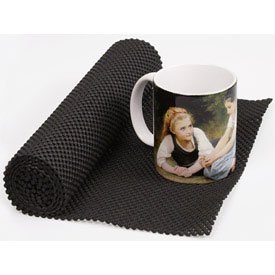
If you are super concerned about germs, you can get anti bacterial removable desk liners from most Bed, Bath and Beyond and similar style of stores. You can get some on Amazon ($3; pictured above).

Step Three: Personalized Handles


If you want to go the extra mile to personalize your desk, you can get change out for new drawer handles. Anthropology ($8 - $15; pictured above) has a ton of different styles of handles as do many hardware stores. Make sure to keep the dorm ones; you'll have to put them back at the end of the school year.

Step Four: Plan, Concentrate, Shop


A desk is a place that you should be able to calmly concentrate, with all of your supplies in easy reach from your seat. Think about what things you use most often: pens, pencils, highlighters, post it notes, paper clips, binders, whatever office supplies you tend to use. Don't take for granted that the "typical" office supplies need to be in ready reach tho. For example, I don't use paper clips or post its very often but I use a lot of binder clips and sticky flags.


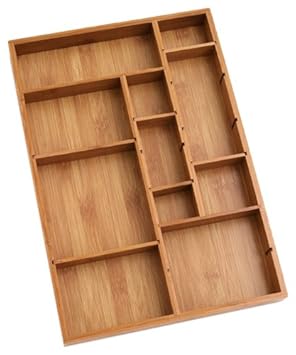
Get a desk organizer or silverware organizer for your drawers. I'd strongly suggest getting bamboo desk organizers because they're easier on the environment and your wallet. There are a ton of different styles and sizes for these desk organizers.


Tips to get the right size: 


  • Be very careful measuring out the interior of your desk when ordering online. Leave a little bit of space if you can, as not all measurements are precise. These small spaces can be filled with thin paper products; don't worry about them.
  • If you're going into the store, you can cut a bit of newspaper or poster to fit inside of your drawer. Place things you're considering on top of the paper to make sure they would perfectly fit you actual drawer.

Step Five: Preserve

Now that everything has a proper place, create the habit of putting things back where they belong.
Plan to clean your desk and drawers regularly. Don't let dust or grime build up; clean more often during the winter flu months.

I'd suggest getting cedar scent blocks for your drawers. They keep away moths. Plus, they smell good.


desk organization: drawers

Organizing the drawers is, I think, the hardest thing to do. My drawer organization shifts as the semester goes on, as my study habits change. As always, the most important thing is finding something that works for you and your habits.

Step One: Clean

Carefully clean the surfaces and all the drawers of your cabinet. At the start of the year, give your desk a good treat of bleach, including the drawers. Trust me it's worth it. No one knows where the last resident stored their half used tissues.


Personally I use Pledge Multi Surface ($11). I also try to clean off the surface of my desk once a week because germs. If you want to go all out get a nice wood polisher, if you have a nice wooden desk. But do make sure to get something with anti bacterial properties.

Step Two: Drawer Check


Make sure that all of your drawers are properly aligned. If problems with the drawers sliding persist, the drawer hinges are probably a bit rusty.

Your dorm manager may be able to hook you up with some grease or WD40 for your desk drawers if they are too creaky or jam a lot. If not, you can buy WD40 from most hardware shops.


If you are super concerned about germs, you can get anti bacterial removable desk liners from most Bed, Bath and Beyond and similar style of stores. You can get some on Amazon ($3; pictured above).

Step Three: Personalized Handles


If you want to go the extra mile to personalize your desk, you can get change out for new drawer handles. Anthropology ($8 - $15; pictured above) has a ton of different styles of handles as do many hardware stores. Make sure to keep the dorm ones; you'll have to put them back at the end of the school year.

Step Four: Plan, Concentrate, Shop


A desk is a place that you should be able to calmly concentrate, with all of your supplies in easy reach from your seat. Think about what things you use most often: pens, pencils, highlighters, post it notes, paper clips, binders, whatever office supplies you tend to use. Don't take for granted that the "typical" office supplies need to be in ready reach tho. For example, I don't use paper clips or post its very often but I use a lot of binder clips and sticky flags.


Get a desk organizer or silverware organizer for your drawers. I'd strongly suggest getting bamboo desk organizers because they're easier on the environment and your wallet. There are a ton of different styles and sizes for these desk organizers.


Tips to get the right size: 


  • Be very careful measuring out the interior of your desk when ordering online. Leave a little bit of space if you can, as not all measurements are precise. These small spaces can be filled with thin paper products; don't worry about them.
  • If you're going into the store, you can cut a bit of newspaper or poster to fit inside of your drawer. Place things you're considering on top of the paper to make sure they would perfectly fit you actual drawer.

Step Five: Preserve

Now that everything has a proper place, create the habit of putting things back where they belong.
Plan to clean your desk and drawers regularly. Don't let dust or grime build up; clean more often during the winter flu months.

I'd suggest getting cedar scent blocks for your drawers. They keep away moths. Plus, they smell good.


Cuter Electronics: Laptop Case

A key to treating a laptop well is having a safe way to carry it. Many backpacks and briefcases now have special sections for carrying laptops. But there are still the hold outs and it's never bad to have too much protection for such an expensive electronic.

Urban Outfitters ($29-$100)

They have a wide selection of different stylish laptop cases. There is a bit of variation in price, but they're all cute.


Amazon Case Logic ($18)


Tuesday, February 26, 2013

Cuter Electronics: Wireless Mouse

I'd suggest add on mice for laptops. They have all sorts of designs; often laptop tablets are a pain for your hands after hours of scrolling through tumblr. I should know.


$29


There are lots of designs to choose from, these and more. They also cary these at Target, but I think that Amazon has more designs to choose from via the comfort of your home. 

I'd recommend this, a pleasure of easy use. These all have very good reviews, as far as comfort for the hands and a long battery life. I have this sort and picked it up at Target right before the start of the year. The mouse works quite well as far as tracking movement and has kept it's battery since I first purchased it. Plus you can turn the mouse off to save the battery life. For storage, you can store the USB in the mouse to keep from losing it. 

What's super fun is that if you and a friend get this type of mouse, the two of you can trade off. Watch out for your friend to pull pranks on you if you don't keep track of when your mouse is plugged in.


Hello Kitty Mouse and pad
$25


Logitech Wireless mouse with larger USB
$20


The only difference between this and the one above is that this one has a larger USB and slightly lower price. Once again: you can store the USB in the mouse; enjoy long battery life and easy use; get via amazon quick shipping.

$33

I figured that this would be a great mouse for the elegant modern types, the types who like to imagine that they are in Star Trek, reboot or old school. 


Wacom Bamboo Pen Tablet Alternative
$65


This is a super cheap tablet, especially considering the specs that this tablet boasts. With pressure sensitivity, you can uses this for drawing or just internet surfing. Artsy types have been using tablets for a long time; this type comes with a good recommendation even for drawing.  This comes with some software in particular ArtRange software. If the software isn't enough, there are plenty of free online softwares for drawing. Make sure you get drawing programs that recognize pressure sensitivity to take full advantage of the tech you're paying for.